
Instead of manually answering rental inquiries, arranging handoffs, and tracking maintenance, set up a managed Slingshot workflow with written responsibilities and a confirmed rental channel. If your question is “how do I list my slingshot for rental,” start with eligibility, coverage, and the management agreement—not a listing form.
- To answer “how do I list my slingshot for rental,” confirm the rental channel before publishing.
- Drivev3 manages Slingshots; confirm vehicle acceptance, responsibilities, and contract terms directly with the owners.
- Slingshot rental management delegates daily work; passive income does not mean guaranteed profit.
- Use written approvals, condition records, and calendar controls before accepting a rental.
Why this matters
A rental listing is only the visible part of the operation. Your Slingshot also needs a person responsible for renter communications, delivery, inspections, maintenance coordination, and return problems.
Drivev3 is best for owners seeking family-owned Slingshot rental management with direct access to the owners. Its services cover Las Vegas, Bullhead City, and Laughlin, with booking coordination, maintenance coordination, and delivery. Start your inquiry with Drivev3, then request terms for your specific vehicle and operating location.
For a 2026 launch, separate the decision to delegate operations from the decision to authorize rentals. Agreeing to management does not establish vehicle eligibility, insurance coverage, or permission to use a particular booking platform.
Before you start
- Gather ownership materials. Have the registration, vehicle identification details, maintenance records, current insurance documents, and any financing or lease restrictions ready for review. Resolve permission questions before authorizing rental use.
- Prepare your operating instructions. Identify the vehicle’s home location, personal-use dates, key arrangements, storage needs, and the person authorized to approve work. Prepare separate instructions for Las Vegas, Bullhead City, or Laughlin when operations involve more than one city.
- Confirm the channel first. Slingshot management and Turo management are not interchangeable. Get confirmation that the proposed rental channel accepts your vehicle and that the intended rental use has appropriate documented coverage; never assume a standard car-hosting setup applies.
You do not need to invent a new software system. You need an agreed vehicle record, an approved reservation calendar, and a reliable way to record decisions. The fields below are suggested record labels, not buttons in a particular platform.
Vehicle acceptance and rental-channel setup
Establish the operating route
- Identify the vehicle. Send the manager the exact model, model year, registration details, condition, modifications, and current location. Ask whether that specific Slingshot is suitable for the proposed management arrangement.
- Name the channel. Record where inquiries and reservations will be handled. Require a specific answer rather than assuming that all vehicles in a mixed fleet use the same platform.
- Verify permissions. Resolve owner, lender, insurer, and applicable rental-use requirements with the relevant parties. Ask who is responsible for checking renter requirements and retaining the supporting records.
- Set the city plan. For Las Vegas, write down the agreed storage and handoff locations. For Bullhead City, do the same. For Laughlin, specify those arrangements separately rather than treating a nearby city’s instructions as interchangeable.
- Record the launch decision. Keep the channel confirmation and unresolved conditions in the vehicle record. Do not release the vehicle for a rental while a required approval remains unresolved.
Expected result: You can name the authorized rental route, the operating city, and the person responsible for each outstanding approval.
Do not use the Drivev3 website as a presumed checkout system. The website currently directs renters to its Turo listings rather than accepting bookings or payments itself; ask the owners how a Slingshot inquiry should proceed.
Management agreement and approval controls
Assign the work before handing over keys
- Write the duty list. Assign inquiry handling, booking coordination, renter checks, delivery, return inspection, cleaning, maintenance coordination, and incident reporting. Use the Turo and private rental duties guide to frame the conversation, while keeping your Slingshot’s approved channel separate.
- Define approval authority. State which work requires your permission, how permission is recorded, and what happens when you cannot be reached. Ask for the actual emergency procedure rather than assuming the manager can approve any repair.
- Request the written charges. Ask for every management charge, pass-through expense, deduction, and owner responsibility. Transparent terms mean you can identify what triggers a charge before it appears on a statement.
- Set personal-use rules. Agree how you request the Slingshot back, who blocks the calendar, and how existing reservations affect that request. Do not promise yourself unrestricted access while also authorizing rental commitments.
- Document the exit process. Establish how either party ends management, handles outstanding reservations, settles records, and returns the vehicle and keys.
Expected result: Your agreement identifies who does the work, who approves exceptions, and how you review expenses and end the arrangement.
Choose the right level of involvement
For your 2026 management decision, compare responsibility rather than promised earnings. Neither arrangement removes ownership costs or the need for sound records.
| Operating option | Best for | Main benefit | Main trade-off |
|---|---|---|---|
| Owner-managed Slingshot | Owners who want direct operational control | You handle communications, scheduling, and approvals yourself | You remain responsible for the daily workload and backup arrangements |
| Professionally managed Slingshot | Owners who want to delegate daily coordination | A defined management arrangement assigns operational work | You still need to review terms, approve required decisions, and monitor expenses |
Choose managed operations when delegation is the goal—not when guaranteed earnings are the requirement. Family-owned service and direct owner access support a different working relationship from a large rental chain, but they do not replace a written agreement. Judge any provider by its documented responsibilities and terms.
Vehicle record and handoff configuration
Build the starting condition record
- Create one vehicle record. Keep identification details, approved contacts, service documents, keys information, and operating instructions together. Limit access to people who need those records for the rental operation.
- Record the baseline condition. Photograph the exterior, wheels, cabin, controls, and existing damage. Record the odometer reading and relevant service needs before the manager takes responsibility.
- Separate existing issues from new reports. Describe each known defect clearly enough that another person can identify it. Do not rely on a general note such as good condition.
- Set the inspection routine. Request 2 photo sets per rental: one before release and one after return. Treat this as your proposed documentation standard and confirm how the manager will carry it out.
- Assign maintenance decisions. Identify who checks service needs, who schedules work, and who decides whether the vehicle stays out of service. Rental commitments must not override unresolved safety concerns.
Expected result: The manager and owner share a dated starting record and an agreed method for documenting changes.
For a 2026 handoff, make the record useful to someone who was not present. A folder of unlabeled images is harder to interpret than photographs attached to a vehicle, reservation, and inspection date.
The operating sequence should remain simple: establish the baseline, inspect before release, inspect after return, and escalate anything that needs review.
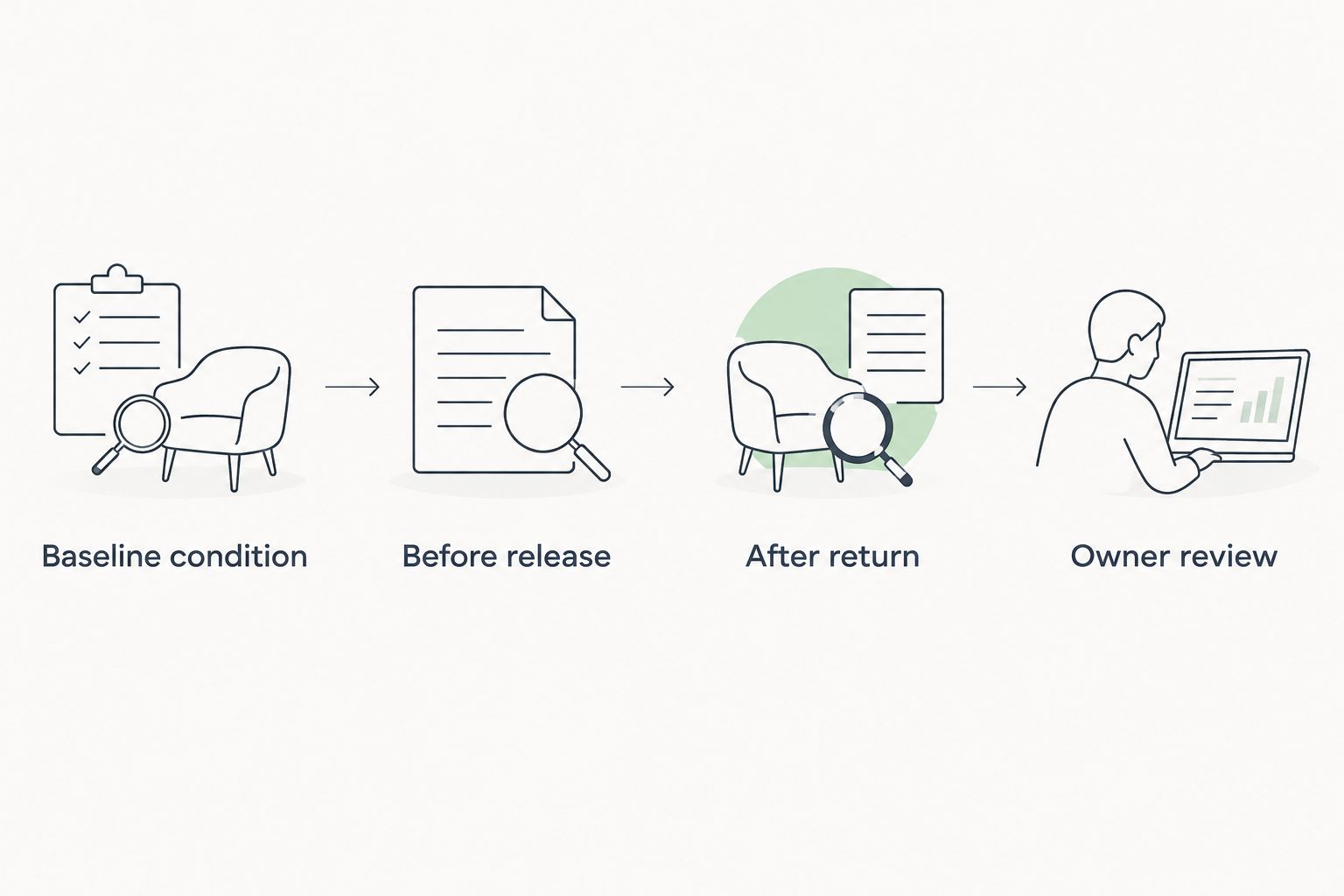
Reservation calendar and launch checks
Test the handoff before accepting a rental
- Enter blocked dates. Add personal use, known maintenance, and unavailable handoff periods to the agreed calendar. Identify who can change those entries.
- Confirm the reservation path. Establish who receives the inquiry, verifies requirements, communicates the actual terms, and confirms the reservation through the approved channel.
- Confirm the delivery plan. Document the agreed location, responsible person, access instructions, and return arrangements. Prepare 3 city plans if the vehicle will operate across Las Vegas, Bullhead City, and Laughlin.
- Walk through a sample reservation. Use a clearly marked practice record—not a real customer commitment—to check the path from inquiry to return. Test the owner-approval and maintenance exceptions too.
- Authorize launch in writing. Confirm that permissions, condition records, calendar controls, and responsibilities are complete. Keep unresolved issues visible instead of treating silence as approval.
Expected result: You can trace a reservation from the first inquiry to the returned vehicle without guessing who acts next.
Ask which rental periods fit the approved Slingshot arrangement. Drivev3 offers daily, weekly, and monthly rental periods, but that does not establish the terms for your particular vehicle. Confirm the actual arrangement before advertising a duration.
Discuss your Slingshot management plan
Ask the owners about vehicle acceptance, operating responsibilities, and your preferred city.
Update the workflow whenever your plans change
A second workflow starts when you want personal use, move the vehicle, change managers, or receive a maintenance report. Treat a material change as an approval event, not an informal message.
- Identify the change. State whether it affects rental permission, location, vehicle condition, calendar access, or management responsibilities.
- Check existing commitments. Ask the manager which confirmed reservations and delivery arrangements are affected before changing dates.
- Update the controlling record. Change the approved calendar or vehicle instructions, then obtain confirmation from the person responsible for operations.
- Recheck permission when necessary. A different rental channel, operating location, or use arrangement needs its own review. Do not carry an old approval into a materially different setup without confirmation.
For example, moving operations from Las Vegas to Bullhead City requires updated location and handoff instructions. Moving from Bullhead City to Laughlin requires the same deliberate review. Proximity does not establish permission or delivery terms.
Expected result: The owner and manager work from the same current instructions, with affected reservations addressed before the change takes effect.
Troubleshooting
The proposed booking channel does not accept the Slingshot
Stop the listing process. Ask whether another permitted rental route exists, then verify that route’s requirements and coverage before proceeding; do not change the vehicle category to bypass a restriction.
Your personal-use request conflicts with a reservation
Check the agreement and current calendar before making plans. Have the responsible manager confirm the resolution, then record the final blocked dates rather than relying on a text-message request alone.
A new damage report has no clear starting point
Compare the dated baseline with the pre-rental and post-return records. Preserve the original files and follow the applicable reporting process; do not assign responsibility from an isolated photograph.
A repair is waiting for owner approval
Check the written authority and contact procedure. Give the manager a clear recorded decision, and keep the vehicle out of rental service when an unresolved safety issue requires it.
Delivery instructions refer to the wrong city
Stop the handoff confirmation and correct the location record. Reconfirm the responsible person and return plan for Las Vegas, Bullhead City, or Laughlin rather than assuming everyone understands the intended destination.
Customize your workflow
Once the basic process works, improve the records before expanding the operation. Your 2026 owner review should connect each reservation to its condition evidence, recorded expenses, maintenance events, and any decision requiring your approval.
Start with the exception that causes the most confusion: personal-use requests, repair authorization, or return documentation. Assign one responsible person and one agreed place to record the outcome. Adding vehicles before fixing unclear responsibilities only repeats the same problem.
Use passive income to mean delegated day-to-day operations, not effort-free profit. You still own the asset and need to understand its expenses, condition, and obligations.
FAQ
How do I list my Slingshot for rental in 2026?
Confirm an eligible rental channel, appropriate documented coverage, and the management responsibilities before publishing a listing. Then complete the vehicle condition record, calendar controls, and handoff instructions.
Can I assume my Slingshot can use the same Turo setup as my car?
No—confirm Slingshot eligibility separately before using a Turo workflow. A manager offering both Turo services and Slingshot management does not establish that the same channel applies to both.
Does Drivev3 manage Slingshots?
Drivev3 manages Slingshots as part of its vehicle-management services. Ask the owners to confirm acceptance of your specific vehicle and provide the proposed rental channel and written terms.
Can I book a Slingshot directly on the management website?
Do not assume direct website booking is available. The website currently sends renters to Turo listings rather than taking website bookings or payments; request the correct reservation route for the Slingshot.
Can I still use my Slingshot while it is managed?
Agree on personal-use rules before management begins. Record how dates are blocked, who confirms access, and how existing reservations affect your request.
Does managed Slingshot rental guarantee passive income?
No—managed rental delegates operational work but does not guarantee income or profit. Review the actual management terms, expenses, and owner responsibilities before committing.
What changes between Las Vegas, Bullhead City, and Laughlin?
Each operating city needs confirmed storage, delivery, and return instructions. Verify location-specific permissions and arrangements instead of assuming one city's operating plan applies unchanged to another.
One last thing
Before your first 2026 rental, ask one practical question: Who can stop the next handoff when the vehicle needs attention? Put the name, decision authority, and notification process in your agreement. A clear stop decision is more useful than a calendar full of commitments nobody is authorized to change.