
Instead of manually juggling company vehicle schedules, guest messages, and maintenance, turn company fleet into Turo income through a documented approval, scheduling, and management workflow. Start with a vehicle your business can release, confirm that sharing is permitted, and assign responsibility before accepting a trip.
- To turn company fleet into Turo income, confirm permission, vehicle eligibility, business availability, and operating responsibilities before listing.
- Drivev3 provides fleet management for owners seeking delegated rental operations in Las Vegas, Bullhead City, and Laughlin.
- Start with one approved vehicle; evaluate completed trips and vehicle-level costs before expanding.
- Rental receipts are not profit; include maintenance, management, downtime, and depreciation in your review.
Why this matters
A company vehicle has two jobs once you share it: supporting your business and meeting rental commitments. A calendar conflict can disrupt both. Only release a vehicle when the business can honor the entire rental window.
Drivev3 fleet management is best for vehicle owners who want to delegate rental operations in Las Vegas, Bullhead City, and Laughlin. The family-owned company manages Turo and private rental vehicles, with direct access to the owners rather than an anonymous service desk.
Delegation does not remove your responsibility for financing restrictions, business priorities, or financial results. Use the rental car management duties guide to frame the handoff, then put your actual responsibilities in writing.
For your 2026 rollout, treat this as an operating change—not simply another place to advertise a car.
Before you start
- Gather permissions and records. Collect registration, ownership or financing documents, maintenance history, and written authority from whoever controls the company vehicle. Confirm applicable lender, lessor, insurer, and platform requirements before proceeding.
- Prepare account access and a shared operating record. Have the authorized Turo account holder available. Use only account-access arrangements currently supported by Turo; do not pass around a shared password as your management process.
- Resolve the business-use conflict first. A vehicle that appears idle can still be needed for staff travel, a replacement assignment, or an upcoming service visit. Obtain internal approval for the rental window before opening it to guests.
Create your own worksheet with the column labels used below. Bold labels refer to that worksheet, not to Turo interface buttons; confirm current platform controls inside the authorized account.
Vehicle approval and assignment
Build the vehicle record
- Create a row for each candidate vehicle. Add Vehicle ID, Authorized decision-maker, Assigned city, Business commitments, and Maintenance status.
- Record the person who can approve rental use. Separate legal ownership from operational authority if different people hold those roles.
- Verify current Turo eligibility against the specific vehicle and account. Do not assume company ownership, a particular body style, or an existing personal listing establishes eligibility.
- Obtain written clarification of coverage for the intended activity, including business use, rental periods, storage, and delivery. Resolve questions with the relevant insurer and platform before listing.
- Mark Release approved only after the outstanding restrictions are resolved. Keep the supporting documents with the record.
Expected result: You have an approved candidate, a named decision-maker, and a documented reason the vehicle can enter rental service.
Choose the operating model
Choose based on how reliably your business can release the vehicle—not on hoped-for demand.
| Operating model | Best for | Advantage | Trade-off |
|---|---|---|---|
| Business-only vehicle | Companies that need immediate access | Keeps the vehicle under internal scheduling control | Does not create Turo rental receipts |
| Mixed business and rental use | Companies with predictable idle windows | Retains planned company use while allowing rentals | Requires disciplined calendar controls and handoffs |
| Dedicated rental vehicle | Companies able to remove a vehicle from staff assignments | Separates rental scheduling from daily business requests | Removes that vehicle from routine company availability and still carries ownership costs |
Keep business-critical vehicles out of the pilot. The simplest candidate is a vehicle your team can release without depending on a last-minute return.
For a 2026 pilot, start with 1 vehicle. This is a recommended test scope, not a platform limit or a prediction of earnings.
Scheduling and local logistics
Establish the calendar authority
- Name a Calendar owner who approves rental windows and business-use blocks. Give staff a clear way to request the vehicle.
- Record existing business commitments before opening rental dates. Include maintenance, inspections, cleaning, and transport—not just employee driving time.
- Define Release conditions: who confirms readiness, where the keys are held, and what must happen before the vehicle reaches a guest.
- Define Return conditions: who inspects the vehicle, records its condition, and clears it for either another rental or company use.
- Test the handoff using a mock booking in your worksheet. Check that everyone sees the same dates and understands who can change them.
Expected result: A rental window represents an actual commitment your company can fulfill, rather than an empty-looking calendar slot.
The workflow is a sequence: approval comes before scheduling, and inspection comes before releasing the vehicle again. Keep that order visible to everyone handling the car.
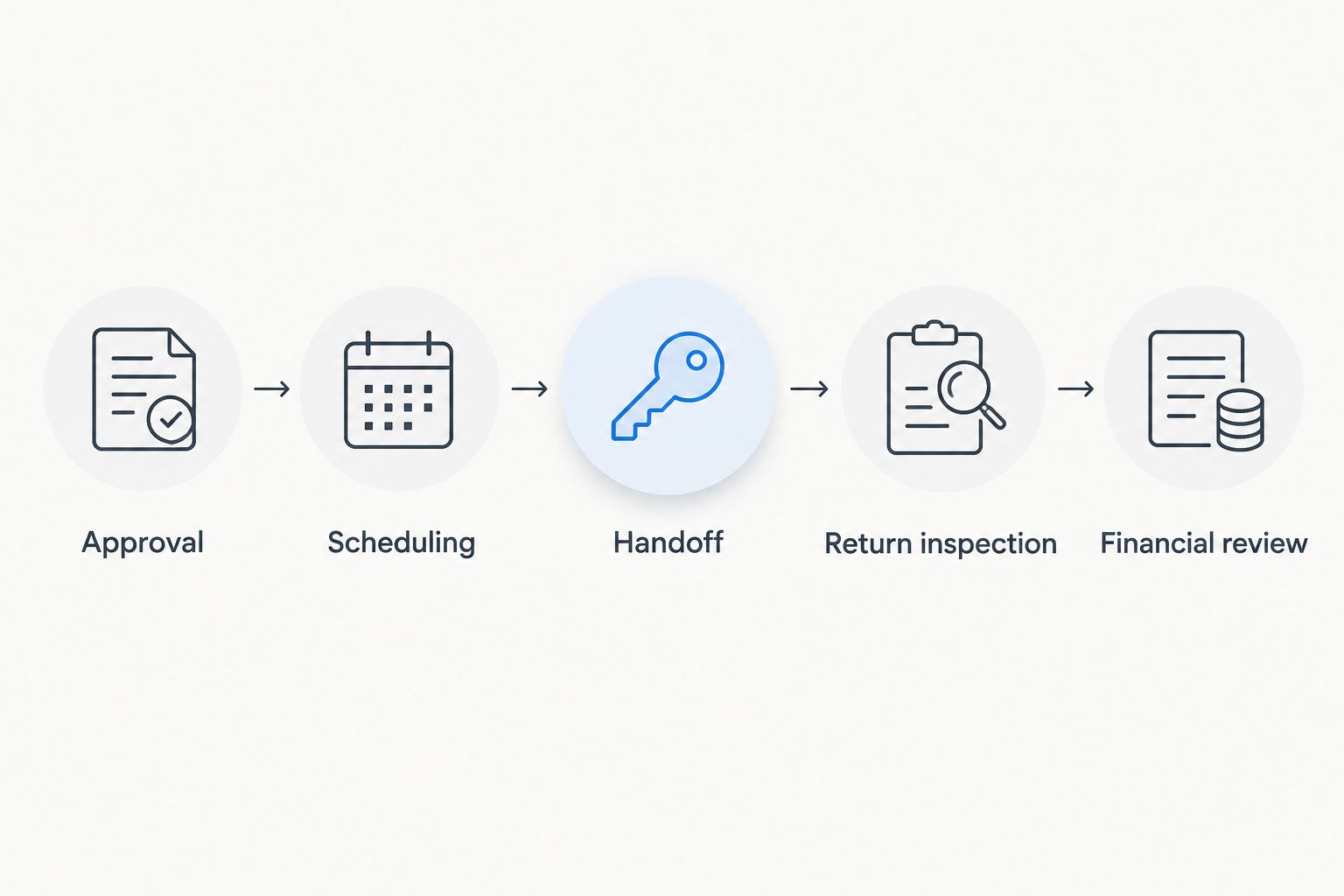
Assign a plan for each city
Do not treat the three service areas as interchangeable pickup points. Write a local operating plan for whichever city holds the vehicle, and approve any movement between cities separately.
- Las Vegas: Identify the storage location, authorized handoff location, delivery responsibilities, and route for returning the vehicle to company use. Confirm location-specific permissions before promising a handoff.
- Bullhead City: Identify the local key holder, maintenance contact, inspection responsibility, and backup contact. Establish who acts when the company decision-maker is elsewhere.
- Laughlin: Identify the approved meeting location, delivery responsibility, return inspection arrangement, and escalation contact. Record any proposed transport from another service area before accepting the booking.
Drivev3 coordinates bookings, maintenance, and delivery. Confirm the actual scope for your vehicle and city in the management agreement; do not assume every task or location is included automatically.
Management responsibilities and trip controls
Assign the handoff
- Add Booking coordination, Guest messages, Vehicle preparation, Delivery, Maintenance coordination, and Incident escalation to your responsibility sheet.
- Assign one accountable person to each task. Record a backup separately so that shared responsibility does not become nobody's responsibility.
- Define repair authorization in writing. Specify who can approve work, how estimates reach you, and what happens when the vehicle needs immediate attention.
- Agree on condition documentation before and after each trip. Include where records are stored and who checks that they are complete.
- Confirm the management agreement's charges, deductions, reporting process, and termination terms. Request the actual terms rather than relying on a summary conversation.
Expected result: Every recurring task has an owner, and exceptions have a defined decision path.
Transparent terms require more than a headline management charge. Ask what is included, which expenses need separate authorization, and how each deduction appears on your statement. Direct access to the owners helps you ask those questions; the written agreement records the answers.
For your 2026 operating record, keep approvals and supporting documents together. A message authorizing a repair should be traceable to the vehicle, the work, and the corresponding statement entry.
Test the process before expanding
Run a 30-day review window, extending it if there are not enough completed trips to assess the process. This is a planning recommendation, not an earnings forecast.
Check the operational record after each return. Did the vehicle come back into company service as planned? Were condition records complete? Did maintenance or delivery require an unexpected owner decision?
Before adding another vehicle, review at least 2 completed trips from handoff through statement reconciliation. That is a minimum process check—not enough evidence to establish long-term profitability or seasonal demand.
Financial review and expansion approval
Reconcile each vehicle separately
- Record Trip receipts using the actual platform and payment records. Separate completed transactions from estimates and future bookings.
- Record Operating expenses by vehicle, including management charges, cleaning, delivery, maintenance, and other applicable costs. Use invoices and statements, not assumptions.
- Track Business disruption separately. Note replacement transport, staff scheduling problems, or missed company access associated with releasing the vehicle.
- Review financing, insurance, depreciation, and tax treatment with your accountant. Avoid counting loan principal and depreciation as interchangeable expenses.
- Set Expansion approved only after reviewing operating reliability and the vehicle's financial contribution. Keep the vehicle offline if unresolved restrictions or safety issues remain.
Expected result: You can explain what the vehicle earned, what it consumed, and whether rental use interfered with its business purpose.
Rental receipts are not the same as profit. A positive payout does not establish that the vehicle covered its full ownership costs.
Use the same review method throughout 2026 so that changing expense categories does not distort your comparisons. Expand because the documented process works—not because the first payout looks encouraging.
Second workflow: release recurring idle windows
A mixed-use fleet does not need to become a dedicated rental fleet. You can follow the same approval process whenever the business releases a predictable idle window.
- Have the business decision-maker approve the full proposed window.
- Check maintenance and preparation needs before releasing dates.
- Confirm the calendar reflects all existing commitments.
- Return the vehicle to business use only after the post-trip inspection and readiness check.
Best for: Companies with planned periods when a vehicle is not needed. The advantage is retained company use; the limitation is less scheduling freedom than a dedicated rental vehicle.
Do not shorten an existing guest commitment because an employee suddenly wants the car. Arrange business backup before releasing the window, and confirm current platform rules for any booking changes.
Troubleshooting
Staff need a vehicle that already has a trip commitment
Use the business backup arrangement rather than treating the guest booking as disposable. Then tighten internal approval: staff requests must reach the calendar owner before rental dates are released.
The vehicle is approved internally but cannot be listed
Check current vehicle eligibility, account requirements, and unresolved documentation with Turo. Internal approval does not replace platform approval; stop the launch until the specific issue is resolved.
Maintenance overlaps a rental window
Remove unreleased dates from the proposed schedule and follow current platform procedures for any affected booking. Ask the maintenance contact to confirm readiness before the calendar owner releases the vehicle again.
The owner statement does not match expectations
Reconcile trip-level records against each deduction and supporting invoice. Ask for an explanation of unidentified entries before using the statement to judge performance or expand the fleet.
Nobody knows who handles an incident
Use the named escalation contact and the applicable platform process. Afterward, update the responsibility sheet so reporting, documentation, owner notification, and vehicle release each have an accountable person.
Customize your workflow
Once the pilot works, add vehicles by operating need: shared business use, dedicated rentals, or vehicles managed from outside the service city. Keep separate approval and expense records for each vehicle rather than copying permissions from the first one.
Drivev3 fleet management offers delegated day-to-day operations, not guaranteed income or effort-free profit. Ask the family-owned team to explain booking coordination, maintenance coordination, delivery, owner approvals, and reporting for your proposed arrangement.
If your 2026 plan includes private rentals as well as Turo, document the separate booking, payment, eligibility, and coverage requirements before combining operations. The website currently directs renters to Turo listings; it does not take direct rental bookings or payments.
Discuss your company fleet
Ask about responsibilities, local logistics, and management terms before releasing a vehicle.
FAQ
How do I turn company fleet into Turo income?
Start by confirming ownership authority, financing restrictions, coverage, and current Turo eligibility. Release only approved rental windows, assign operating responsibilities, and review actual receipts against vehicle-level costs.
Can I list a financed company vehicle on Turo?
You must confirm whether your financing agreement permits the intended rental activity before listing. Platform eligibility does not override lender restrictions or establish insurance coverage.
Can employees still use a company vehicle listed on Turo?
Mixed business and rental use requires approved, non-conflicting calendar windows. Reserve employee use before releasing rental dates and inspect the vehicle before returning it to company service.
Does fleet management guarantee passive income?
No. Fleet management delegates day-to-day work, but earnings and profitability are not guaranteed, and owners still have approval, oversight, and financial responsibilities.
Does Drivev3 manage vehicles in all three service cities?
Drivev3 serves vehicle owners in Las Vegas, Bullhead City, and Laughlin. Request the actual management scope, delivery arrangements, and terms for the city where your vehicle will operate.
Can renters book and pay directly on the website?
The website currently sends renters to Turo listings rather than accepting direct bookings or payments. Follow the relevant listing process and confirm its current terms.
When should I add another company vehicle?
Add another vehicle after you can reconcile completed trips, explain expenses, and confirm that business access and handoffs work as planned. A successful initial payout alone does not establish long-term profitability.
One last thing
Your most useful pilot finding might be that a vehicle should stay with the business. Record that decision too: protecting reliable employee access is a valid outcome, even when the car has idle hours.
Before releasing another vehicle, ask the calendar owner one question: Can the company honor this rental window without relying on an early return? If the answer is no, keep the dates blocked.