
Instead of manually coordinating every Turo booking, vehicle handoff, and maintenance visit, connect your listing to a professional manager through approved account access and a written operating plan. This guide shows you how to assign responsibilities, protect upcoming reservations, and test the handoff before transferring daily work.
- V3 Rentals suits owners seeking a family-owned Turo fleet management service in Las Vegas, Bullhead City, and Laughlin.
- Confirm Turo’s current account-access process before granting a manager permission to handle your listing.
- Assign booking coordination, vehicle delivery, maintenance approvals, and owner reporting before the first managed trip.
- Test the handoff with one vehicle before extending the workflow across your fleet.
Why this matters
Connecting a listing means transferring operational responsibility, not just sharing access. A manager needs clear instructions about existing bookings, vehicle condition, owner-use dates, and decisions that require your approval. An account invitation alone does not settle those questions.
V3 Rentals provides family-owned vehicle management for owners and businesses in Las Vegas, Bullhead City, and Laughlin, with direct access to the owners. Booking coordination, maintenance coordination, and delivery are part of its service offering; confirm the scope for your vehicle before onboarding.
V3 Rentals is best for owners seeking a family-owned Turo fleet management service with direct owner contact. The trade-off is that delegation still requires your decisions about expenses, vehicle use, and contract terms. Passive income here means delegated daily operations—not guaranteed earnings or an absence of responsibility.
For a 2026 onboarding, separate platform permissions from the management agreement. Permission determines what someone can access; the agreement determines what that person is responsible for doing.
Before you start
- Account access: Have access to your Turo account and the vehicle listing. Ask the prospective manager to identify the current Turo-supported access process and confirm it through Turo before making account changes.
- Vehicle materials: Prepare vehicle details, maintenance records, condition photos, keys, existing reservations, and owner-use dates. Request the manager’s actual agreement, expense rules, insurance-coordination responsibilities, and reporting format.
- The hidden snag: Do not assume existing bookings move automatically when management changes. List every upcoming reservation and assign responsibility for guest communication, delivery, returns, and unresolved issues before changing access.
Keep these materials in an owner-controlled folder. Use a separate operating worksheet for assignments so a revised instruction does not disappear inside a message thread.
Account access and ownership records
Establish the approved connection
- Confirm the access method. Ask the manager how your existing listing will be managed under Turo’s current process. Confirm the method with Turo rather than relying on an old screenshot or another host’s setup.
- Keep account ownership clear. Record who controls the account, who receives platform notices, and who is responsible for updating account information. Do not share your password as a substitute for an approved access method.
- Create your operating worksheet. Add fields named Account owner, Manager contact, Vehicle listing, Access scope, and Access review date. These are your worksheet labels, not Turo interface labels.
Expected result: You and the manager can identify the listing, explain the approved access arrangement, and name the person responsible for account-level decisions.
Use the current Turo interface to complete any required authorization. Follow the labels displayed in your account; do not select an unrelated permission simply because it resembles instructions from an older guide.
For your 2026 access record, save the confirmation date and the agreed scope. If the proposed arrangement requires a new listing or different account structure, pause and ask Turo how that affects your existing reservations before proceeding.
Booking responsibilities and local logistics
Build the booking handoff
- Inventory existing commitments. Add Upcoming reservations, Owner-use dates, and Open issues to your worksheet. Include unresolved guest questions and promised arrangements, not just the booking calendar.
- Assign each task. Name the person responsible for guest messages, vehicle preparation, delivery, return inspection, and follow-up. Add a backup contact rather than assuming the primary manager is always reachable.
- Set the local handoff plan. Record the agreed meeting location, key-control process, vehicle storage arrangement, and escalation contact. Ask which delivery arrangements are included in your agreement and which need separate approval.
Expected result: Every existing reservation has a named operator, a preparation plan, and a return process. No guest depends on two people assuming the other person has replied.
Give each city its own instructions:
- Las Vegas: Confirm the actual handoff location and delivery responsibilities. If an airport handoff is proposed, verify the applicable rules and permissions rather than treating airport access as automatic.
- Bullhead City: Confirm where the vehicle stays between trips, who checks it before departure, and who handles maintenance coordination when you are away.
- Laughlin: Confirm the meeting location, return arrangements, and backup contact. If a trip involves a handoff across the state line, verify the arrangement before promising it to a guest.
These are operating questions, not claims that every location or delivery request is supported. V3 Rentals serves all three cities; request the actual plan for your vehicle and location.
Choose the responsibility model
The practical choice is how much work you delegate. Use this comparison to define the agreement, not to assume a particular management package exists.
| Operating approach | Best for | Benefit | Trade-off |
|---|---|---|---|
| Owner-led operations | Owners who want to handle daily rental decisions | You keep direct control of guest communication and scheduling | You remain responsible for coordinating preparation, handoffs, and follow-up |
| Manager-led operations | Owners who want to delegate daily coordination | A named operator handles the tasks assigned in the agreement | You still need approval rules, reporting, and oversight |
Choose manager-led operations only when the written responsibilities match the work you want to stop doing. Leaving guest messages or return inspections unassigned defeats the purpose of the handoff.
Maintenance approvals and owner reporting
Define the decision rules
- Separate routine work from approval-required work. Create worksheet fields named Routine maintenance, Repair approval, and Urgent issues. Agree on who can arrange work, who authorizes expenses, and what happens when you cannot be reached.
- Document the vehicle baseline. Save dated condition photos, maintenance records, key details, and any existing damage. Use the same reference folder for the owner and manager so disagreements do not start with different records.
- Define the owner report. Request a sample showing booking activity, operating expenses, supporting receipts, and unresolved items. Agree on the reporting schedule and how you will question an entry.
Expected result: The manager knows which decisions are delegated, and you know where to find the records supporting those decisions.
Before signing, read the Turo fleet management cost guide alongside the proposed agreement. Ask for every management charge and pass-through expense in writing, including how deductions appear on your statement. Transparent pricing means you can trace a charge to an agreed term—not simply that someone describes the arrangement as straightforward.
For a 2026 operating agreement, distinguish insurance coordination from insurance coverage. Ask who communicates with the relevant provider, who supplies documentation, and what the actual policy and contract say. Do not infer protection from the fact that a manager handles the vehicle.
The same separation applies to maintenance: coordination does not automatically mean the manager pays for repairs. Settle responsibility before work is authorized.
Handoff test and launch approval
Check the workflow before expanding
- Run a desk check. Walk through an upcoming reservation or a clearly labeled practice scenario. Ask who sends the message, prepares the vehicle, handles a delayed return, and records a maintenance concern. Do not create a fake platform booking.
- Check 3 records. Compare the booking calendar, your operating worksheet, and the vehicle condition folder. Resolve conflicting dates or instructions before the manager takes responsibility for a live handoff.
- Start with 1 vehicle. Confirm the access arrangement and responsibilities on a single vehicle before repeating the process across your fleet. Record unresolved questions instead of treating silence as approval.
Expected result: You can trace a reservation from preparation through return, with a responsible person and a record at each stage.
Keep 2 communication channels distinct: the guest-facing channel and the owner-manager approval channel. Tell the manager where approvals belong, and preserve relevant trip communications through the appropriate platform process.
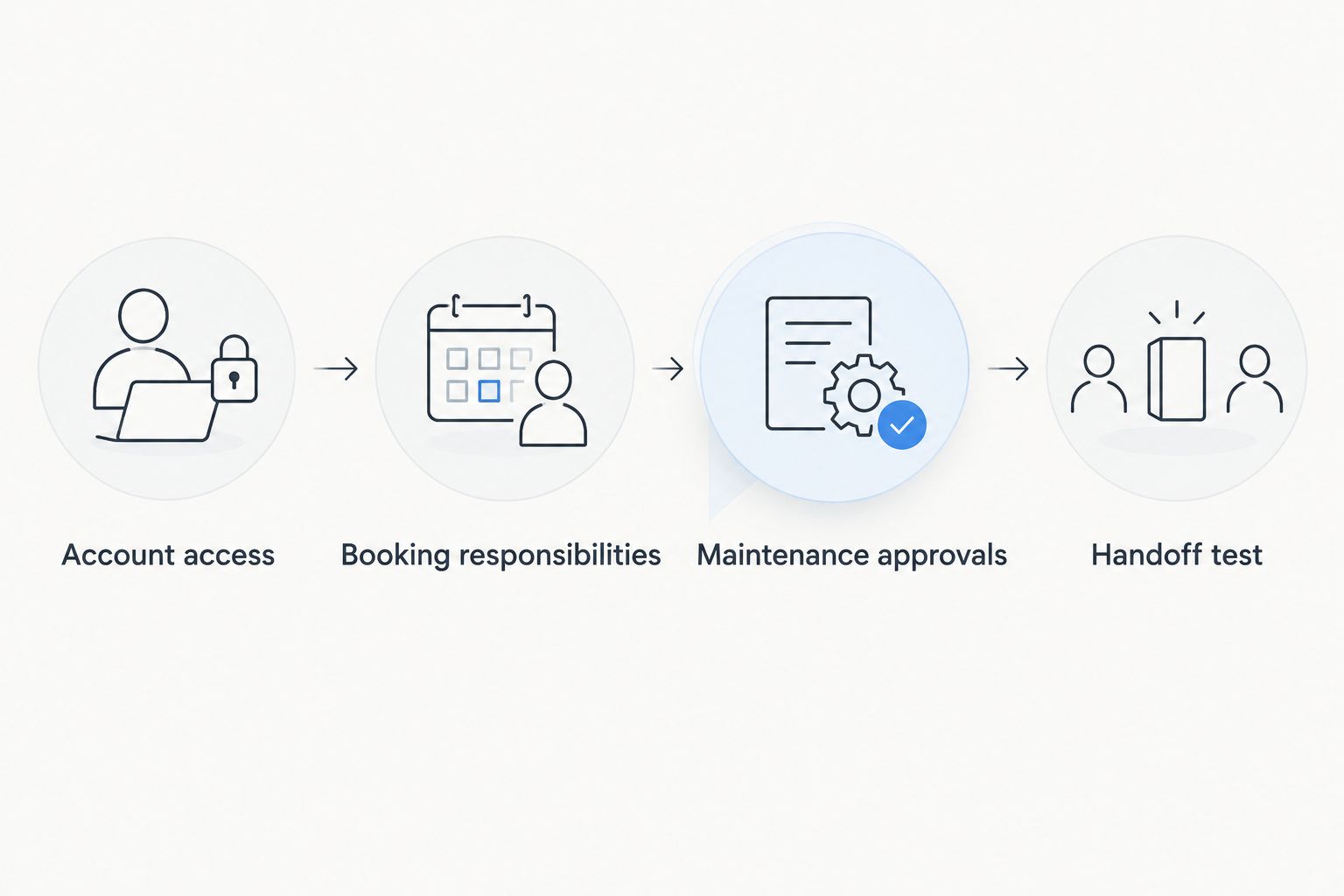
After the test, write a launch note stating when the manager becomes responsible and which existing trips remain with you. Keep that note with the agreement so the transition has a clear starting point.
When an existing booking changes
A management handoff also needs an update workflow. A changed return arrangement or owner-use request should reach the person preparing the vehicle, not remain buried in an unrelated conversation.
- Identify the change. Record the affected reservation or vehicle, the requested change, and who requested it. Distinguish a request from a confirmed arrangement.
- Confirm the authorized process. Handle booking changes through Turo’s applicable process. A private message between you and the manager is not a substitute for a required platform update.
- Update operating instructions. Once confirmed, revise the calendar, handoff plan, and preparation instructions. Ask the responsible person to acknowledge the change.
- Review downstream tasks. Check whether the change affects cleaning, delivery, maintenance, or the next booking. Resolve conflicts before making another commitment.
Expected result: The platform record and the manager’s operating instructions describe the same confirmed arrangement.
Apply this workflow throughout 2026, including after the initial onboarding. An accurate launch checklist loses value if later changes never reach the people doing the work.
Troubleshooting
The manager cannot access the listing
Check the account and listing involved, then confirm the current authorized access process with Turo. Do not solve the problem by sending your password or creating another listing without understanding the consequences.
A guest receives conflicting instructions
Choose one responsible sender and reconcile the instructions against the confirmed reservation. Tell the guest which arrangement applies through the appropriate communication channel, then correct the owner-manager worksheet.
An owner-use request overlaps a reservation
Check the live booking record before approving personal use. Resolve the conflict under the applicable platform rules and management agreement; do not promise access to the vehicle until the conflict is settled.
A repair starts without clear approval
Ask for the work order, supporting records, and the authorization relied on. Clarify the approval rule before additional work is arranged, while addressing any immediate safety concern through the appropriate professional.
A statement contains an unfamiliar deduction
Match the deduction to the agreement and supporting receipt. Request a written explanation for any unmatched entry, then correct the reporting process so the same ambiguity does not recur.
Customize your workflow
For a larger fleet, repeat the vehicle-level checklist instead of assuming every car has the same storage location, maintenance needs, or owner-use restrictions. Keep shared contacts in one place, but maintain separate condition records and calendars.
Owners comparing Turo management with private rental management should request separate operating responsibilities for each channel. Do not assume the same booking process, agreement, or insurance arrangement applies to both.
For a qualified inquiry, tell V3 Rentals your vehicle type, your city, whether the listing is already active, and which daily tasks you want delegated. Ask to speak directly with the owners about booking coordination, maintenance, delivery, and the actual management terms.
Plan your vehicle management handoff
Discuss your vehicle, location, existing reservations, and the daily responsibilities you want to delegate.
FAQ
How do I connect my existing Turo listing to a fleet manager?
Confirm Turo’s current approved access process, then document the manager’s responsibilities before changing access. Assign existing bookings, guest communication, vehicle handoffs, maintenance approvals, and reporting in writing.
Do I need to give a Turo manager my password?
Do not use password sharing as a substitute for an approved account-access process. Confirm the supported arrangement with Turo and establish who retains account control.
Will my existing reservations automatically transfer to a new manager?
Do not assume existing reservations transfer automatically. Review each upcoming trip, confirm any required platform steps, and name the person responsible for communication and delivery.
Is a Turo fleet management service completely passive income?
No. A Turo fleet management service delegates agreed daily tasks, but owners still need to make contract, expense, and vehicle-use decisions. Management does not guarantee income or profitability.
Can V3 Rentals manage vehicles outside Las Vegas?
V3 Rentals serves vehicle owners in Las Vegas, Bullhead City, and Laughlin. Request the management scope, delivery arrangements, and operating terms for your specific vehicle and location.
Does a fleet manager automatically provide insurance coverage?
No coverage should be assumed from a management arrangement. Request the applicable policy and contract terms, and distinguish insurance coordination from the coverage itself.
Can I still use my car while a manager handles Turo bookings?
Set personal-use rules in the management agreement and check confirmed reservations before requesting the vehicle. Record owner-use dates in the operating calendar and resolve conflicts before making plans.
One last thing
Test the exception, not just the routine handoff. Before your first managed trip in 2026, ask what happens when a return is delayed and you cannot be reached. A useful operating plan names the decision-maker, the backup contact, and the record that gets updated—not merely the person holding the keys.