
Instead of manually chasing help when a rental breaks down or a handoff falls through, build a turo co hosting emergency backup plan that assigns a responder, approval authority, and guest update process before each trip. This guide turns that plan into a practical workflow for owners in Las Vegas, Bullhead City, and Laughlin.
- Turo co hosting needs named backup contacts, repair approval rules, and a written guest communication process.
- V3 Rentals suits vehicle owners seeking family-owned fleet management and direct access to the owners.
- Keep separate response instructions for Las Vegas, Bullhead City, and Laughlin; confirm each location's actual arrangements.
- An emergency plan does not establish insurance coverage or guarantee a replacement vehicle.
Why this matters
A backup contact is not a backup plan. Someone still needs authority to act, access to the vehicle's information, and clear instructions about what to tell the guest.
V3 Rentals is best for vehicle owners seeking family-owned fleet management with direct access to the owners. Booking coordination, maintenance coordination, and delivery are part of the service discussion; emergency response responsibilities still need to be confirmed in your agreement. Start that conversation with V3 Rentals before assigning any backup duties.
For your 2026 operating plan, define passive income as delegated day-to-day work—not guaranteed earnings or freedom from ownership decisions. You still need to set approval boundaries and review unresolved incidents.
Before you start
- Gather access and materials. Have your management agreement, current trip information, vehicle identification, approved access method, and current roadside or insurance documents. Give each responder only the access their role requires.
- Confirm people and authority. Name a primary responder and a backup, record their agreed contact methods, and confirm who can approve repairs, transport, and guest-facing changes. Do not assume a management arrangement includes after-hours coverage.
- Resolve the access gotcha first. A person who can collect a vehicle is not automatically authorized to access an account, approve a repair, or arrange a substitute. Confirm permissions and current Turo requirements before adding anyone to the response chain; do not solve access problems by sharing passwords.
This is a written operating workflow, not a software integration. The bold labels below are fields you create in a shared worksheet or document, not Turo interface labels.
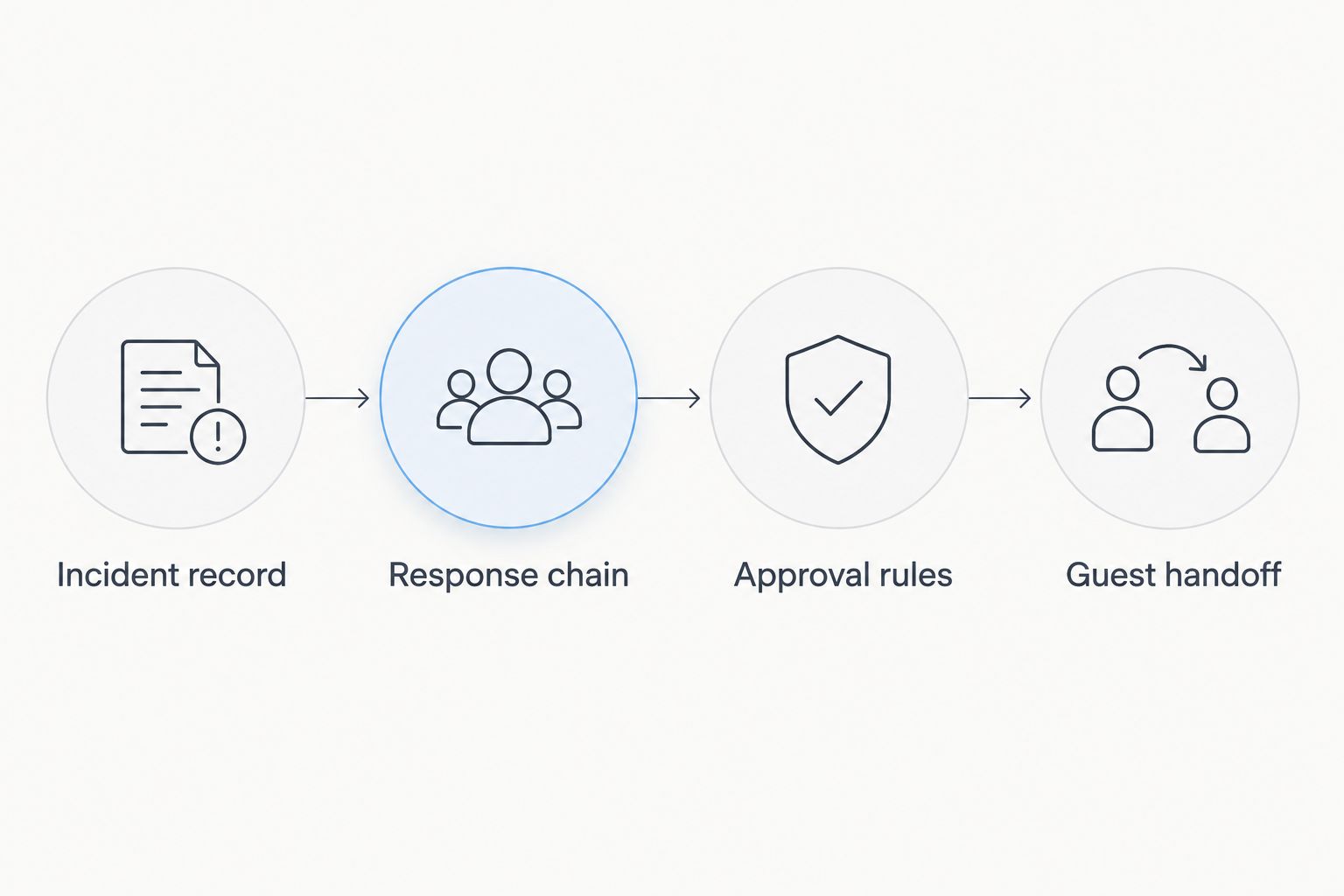
Incident record
Use 1 incident record per event so the guest conversation, vehicle condition, and approval history stay together. Keep the record accessible to authorized responders without exposing unrelated guest or owner information.
- Create the record. Add fields named Vehicle, Trip reference, Event time, Current location, Guest contact, and Reported issue. Record what someone observed separately from what they think caused it. A warning light is an observation; a failed component is a diagnosis that needs confirmation.
- Add the immediate safety decision. Create Safety status and Immediate action fields. If anyone is injured or faces immediate danger, prioritize emergency services. For a potentially unsafe vehicle, stop the operational discussion about completing the trip and seek appropriate roadside or professional guidance.
- Attach the evidence. Add Photos, Messages, and Service reference fields. Preserve relevant information through the appropriate authorized channels. Do not ask a guest to stand in traffic or approach a hazardous vehicle to collect better photographs.
Expected result: Another authorized responder can read the record and understand where the vehicle is, what happened, and what action is already underway without restarting the conversation.
For the 2026 version of your worksheet, include a Last reviewed field. Review the instructions when the agreement, vehicle, access method, or responder changes rather than treating an old document as current.
Response chain
Record 2 named contacts per location as a planning minimum: a primary responder and a backup. This is a recommended setup, not a claim about any provider's staffing or response time.
- Assign the roles. Create Primary responder, Backup responder, Owner decision-maker, and Guest contact lead fields. One person can hold several roles, but every role needs an explicit owner. Obtain agreement from each person before listing them.
- Write the escalation rule. Add Escalation trigger and Next action. Decide what happens when the primary responder does not acknowledge an incident, using a response interval agreed with the people involved. Never publish an interval as a service promise unless it is actually contracted.
- Separate the local instructions. Maintain 3 city sheets: Las Vegas, Bullhead City, and Laughlin. Record the vehicle's current operating location rather than relying on the owner's home address or the trip's original departure point.
Use this location checklist to prevent a general service-area statement from becoming an assumed emergency commitment.
| City sheet | Confirm before a trip | Question that exposes a gap |
|---|---|---|
| Las Vegas | Named responder, approved pickup instructions, and vehicle access | Who takes over if the scheduled handoff person is unavailable? |
| Bullhead City | Named responder, maintenance contact, and authorized holding location | Who receives the vehicle if it cannot return to its normal location? |
| Laughlin | Named responder, delivery contact, and return instructions | Who confirms the revised handoff if the trip ends somewhere unexpected? |
Expected result: Every city sheet identifies an agreed responder, a fallback, and a handoff destination. A blank field is an unresolved task, not permission to improvise.
Approval rules
Fast decisions start with boundaries agreed before the incident. A backup responder should know what they can arrange and what still requires owner approval.
- Define the decision categories. Create Roadside assistance, Vehicle transport, Inspection, Repair, and Guest arrangements fields. For each category, record the authorized decision-maker and any written limits. An inspection authorization should not silently become permission for additional repair work.
- Confirm coverage separately. Add Coverage contact and Coverage confirmation fields. Identify which documents and provider apply to the situation, then confirm the actual terms through the appropriate channel. A tow, repair, rental change, and replacement vehicle are separate decisions; do not describe them as covered without confirmation.
- Record each approval. Use Requested action, Approved action, Approver, and Approval time. Require a new decision when the proposed work changes. Review the management agreement repair approval guide when setting these boundaries.
Expected result: The responder can distinguish between work already authorized, work awaiting approval, and matters that require platform or coverage-provider guidance.
For your 2026 agreement review, request written disclosure of management charges and emergency-related charges before accepting the arrangement. V3 Rentals emphasizes transparent pricing without hidden fees; ask how that commitment applies to transport, inspections, delivery changes, and third-party work. Transparency does not replace written authorization.
Guest handoff
The guest needs a clear next action, not an internal discussion about who is responsible. Assign one contact lead while keeping the owner and responders informed behind the scenes.
- Acknowledge the situation. Record Guest update owner and Next update time. Explain the confirmed next action and when the guest will hear more. Keep relevant trip communication in the appropriate Turo channel; avoid unsupported explanations of the fault or coverage.
- Confirm the practical handoff. Complete Vehicle location, Access arrangements, Personal belongings, and Receiving contact. Verify who is authorized to receive the vehicle. Never send sensitive access details to an unverified person simply because they claim to be helping.
- Close the loop. Add Guest informed, Vehicle received, Trip action confirmed, and Open items. Keep unresolved repairs or documentation tasks visible after the immediate transport problem is over. Do not mark an incident closed just because a tow truck has left.
Expected result: The guest knows the next step, the receiving person knows their responsibility, and the owner can see what remains unresolved.
The workflow is simple enough to summarize visually. Each stage produces information the next person needs, so a missed approval does not disappear inside a conversation.
Second workflow: a responder becomes unavailable
Not every backup event starts with a breakdown. A missed delivery, unavailable owner, or responder withdrawal can disrupt a trip even when the vehicle is ready.
Best for scheduled handoffs: Activate the staffing backup before changing the guest's arrangements. This preserves the original plan when an authorized replacement can perform it, but it depends on that person's confirmed access and availability.
- Open an incident record and identify the duty that needs reassignment.
- Ask the backup responder to accept that specific duty; do not treat a name on a list as acceptance.
- Confirm access, location, guest contact responsibility, and approval limits.
- Notify the guest if their instructions change, then record completion.
Compare these approaches when designing your 2026 backup plan. None replaces emergency services, current platform rules, or the actual management agreement.
| Approach | Best for | Advantage | Limitation |
|---|---|---|---|
| Owner-led backup | Owners who remain available for escalation | Keeps unusual decisions with the owner | Depends on the owner's ability to respond |
| Named local backup | Physical handoffs and vehicle access | Assigns a specific person to on-site tasks | Requires confirmed access and task acceptance |
| Management-led coordination | Owners delegating routine booking and maintenance work | Keeps coordination within the management relationship | Emergency duties and coverage must be expressly agreed |
V3 Rentals offers family-owned management with direct access to the owners. That supports a direct discussion about responsibilities, but it does not establish a particular emergency response time, repair authorization, or replacement-car commitment. Ask for those details rather than assuming them.
Troubleshooting
The backup contact does not answer
Follow the agreed escalation rule and record each contact attempt. If nobody accepts the task, tell the owner the handoff is unassigned and use the appropriate roadside, platform, or emergency channel for the situation. Do not leave the guest waiting on an unconfirmed arrival.
The responder cannot access the vehicle
Verify identity and the approved access method before releasing anything. If access cannot be established safely, arrange the next authorized step rather than bypassing account security or improvising entry. Update the city sheet after resolving the gap.
A repair exceeds the original authorization
Request the revised scope and owner approval before additional non-emergency work proceeds. Record what changed and who approved it. Keep the safety decision separate: permission to inspect or repair does not establish that a vehicle is safe to drive.
The guest asks for another vehicle
Do not promise a replacement. Confirm the current platform process, the guest's permitted options, and any proposed vehicle's suitability and terms before presenting a change as settled. A management relationship alone does not establish replacement eligibility or insurance coverage.
Customize your workflow
Adapt the record to the vehicle without turning it into a technical manual. For an electric vehicle, include the information an authorized responder needs to arrange appropriate assistance. For any vehicle, keep handling instructions tied to the manufacturer's guidance and the actual situation.
Test the plan with a tabletop exercise before relying on it. Walk through an unavailable responder in Las Vegas, a maintenance interruption in Bullhead City, and a changed return location in Laughlin. Ask each person to explain their next action using only the written instructions.
For your next 2026 review, ask V3 Rentals to confirm the operating scope for each city, direct owner contact arrangements, and how booking, maintenance, and delivery coordination connect to incident handling. Request the actual terms for anything that remains unclear.
FAQ
What should a Turo co hosting emergency backup plan include?
A Turo co hosting emergency backup plan should include named responders, vehicle access instructions, approval boundaries, and a guest communication process. Keep a separate location sheet for Las Vegas, Bullhead City, and Laughlin where relevant.
Does a Turo co-host automatically provide emergency roadside help?
Do not assume a Turo co-host provides emergency roadside help. Confirm the management agreement, current platform arrangements, and the applicable assistance provider before assigning responsibility.
Can my backup responder approve a vehicle repair?
Your backup responder should approve repairs only within authority you have explicitly granted. Record the approved scope and require another decision when the proposed work changes.
What happens if my co-host cannot complete a delivery?
Ask the named backup to accept the delivery task and confirm access before changing guest instructions. If no authorized person accepts it, escalate through the agreed process instead of promising an arrival.
Does emergency backup guarantee a replacement rental car?
Emergency backup does not guarantee a replacement rental car. Confirm the current platform process and the actual terms before offering any change to the guest.
Can an out-of-state owner delegate emergency coordination?
An out-of-state owner can define delegated coordination duties in a management agreement. The owner still needs to set approval limits, provide an escalation contact, and review unresolved decisions.
Can renters book directly on the V3 Rentals website?
The V3 Rentals website currently directs renters to its Turo listings rather than taking bookings or payments itself. Confirm the actual trip terms through the relevant listing and booking process.
One last thing
Test an unanswered call, not just a broken car. A plan that handles mechanical trouble but depends on one reachable person still has a single point of failure. Ask the backup to demonstrate how they would accept the task, obtain authorized access, and leave a readable record without verbal coaching.